
Touch controls (phones and tablets)
Playing with your thumbs: the move stick, the camera, the Attack pad, the power ring around it and the buttons along the bottom.
This page is about playing on a phone. Show the phone edition
On a phone or tablet the screen is the controller. Your left thumb moves, your right thumb looks and fights, and every window works with taps.
Moving and looking
| Where | What it does |
|---|---|
| The left of the screen | Put your thumb down anywhere and a move stick appears under it. Inside its ring you walk; push past the ring to run. |
| The right of the screen | Drag to turn your view. Pinch with two fingers to zoom; in the top-down view a twist of two fingers turns the view and dragging them up or down together tilts it. A tap selects what it touches; a double tap uses it (talk, open, loot); a hold is the right click (a player's menu, or a march order in the top-down view). |
Fighting
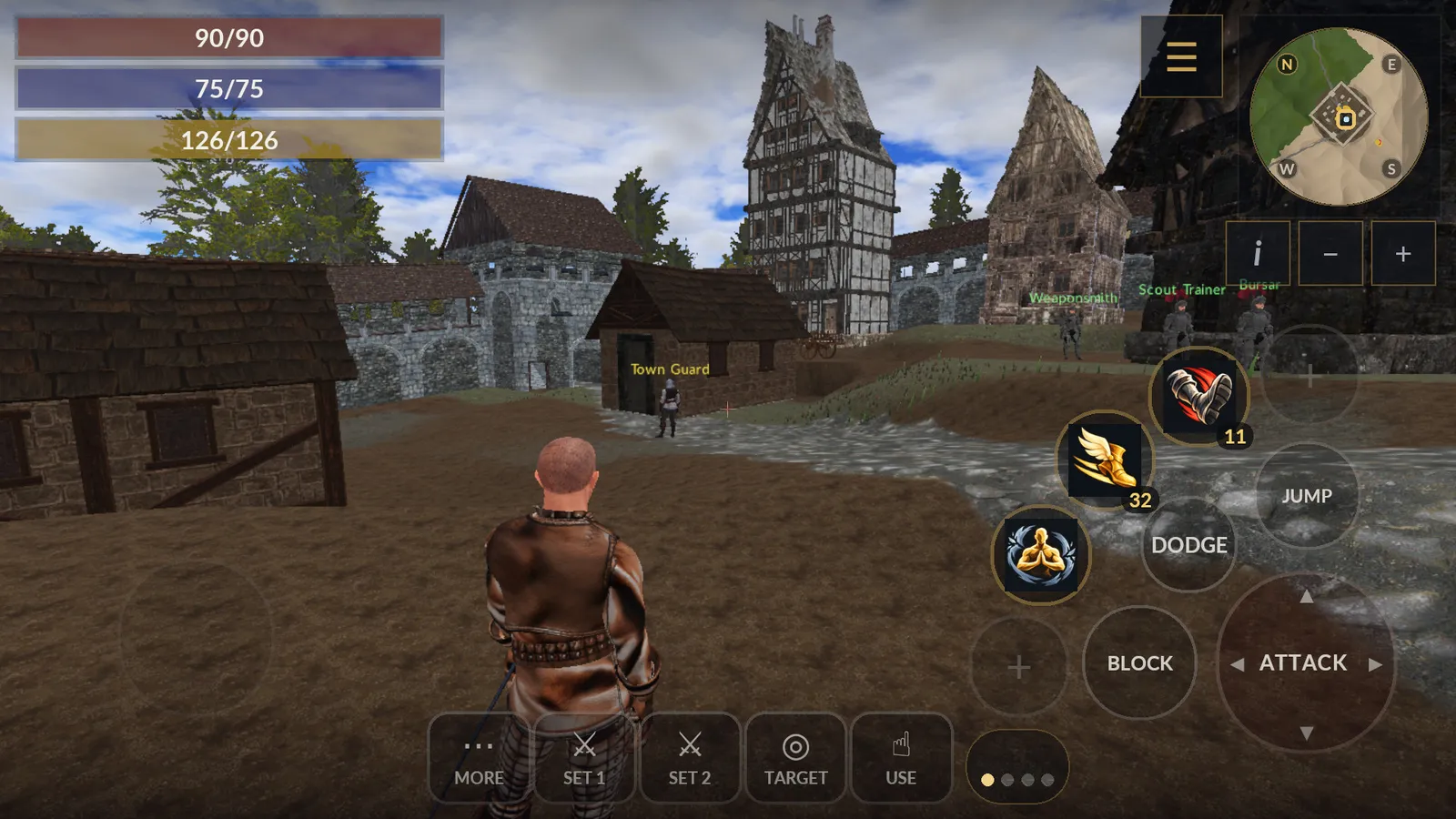
| Button | What it does |
|---|---|
| Attack | Where your thumb lands is the swing: the top for an overhead blow, the bottom for a thrust, the left or right edge for a slash. Keep it down to hold a blow or draw a bow, and slide it to aim while you draw. With a one-handed or two-handed weapon or a staff, sliding to another edge of the pad while you hold a blow changes the swing; only sliding off the pad turns your view. |
| Block | Held: your guard (a parry with a lone blade: slide your thumb toward a side to parry there). Tapped during a held swing: a feint. |
| Jump, Dodge | Jump; dodge the way the stick leans (back when it is centred). |
| Use | Along the bottom, nearest your right thumb: mount and dismount, doors, loot, talk, gather. |
| Target, Set 1, Set 2 | Along the bottom: select what is under the crosshair, and draw, switch or put away your weapon sets. |
| More | Unfolds Crouch (tap again to stand) and Kick above itself, and while they apply: Fly or Land (when you can fly), Pack (a selected horse, pegasus, siege engine or ship back into its figurine, kit or deed) and Lock or Unlock (a door under your crosshair you may lock). It is outlined in gold while one of these waits inside it, and folds away again once you use one. |
| Footing | With a spear or halberd drawn, Kick under More becomes Footing: it steps into your other footing. |
| Talk | There only while voice chat is on: hold it to speak to the players around you. When you turn voice chat on, your phone asks to let the game use the microphone; if you refuse, Talk sends nothing and says so, and the phone's settings for the game can allow it later. |
| Party (or Guild, Council, Nation) | Above Talk while voice chat is on and you belong to that channel: hold it to speak to your party, or to the channel chosen in Options or with /voice. |
| Shout | Above them while voice chat is on: hold it to shout, heard up to about 100 metres away. |
The power ring
Your powers and potions sit on an arc of large buttons around the Attack pad, under your right thumb. Each shows its icon, its cost (blue mana, yellow stamina, red health; the number turns red when you are short of it), a potion's count, and its recharge as a shade that falls away. A greyed button cannot be used now (the wrong weapon, dead ground).
| Do this | And |
|---|---|
| Tap a power | It goes off at once, at your target, as a click does on a PC. |
| Hold a power | It aims: a ring marks the crosshair and the line under it says who or where it would hit. Slide your thumb to turn your view and aim, and lift it to cast. An area power marks the ground where it will burst. |
| Slide back onto the power, or lift on Cancel | Nothing is cast. |
| Lift on Self | A healing or helpful power with nobody friendly picked goes to you. |
| Tap the dots under the ring, or swipe them | The next page of the ring, or the one before: four pages of five. |
To heal or help someone, first tap their row in the party frame (or your own health, mana and stamina bars for yourself): a helpful power from the ring then goes to them even while the crosshair crosses someone else.
To change the ring, open the Powers window from the menu: hold a power there and drop it on a ring slot (an empty slot shows +); drag a slot onto another to swap them, or off the ring to take it off. To put a potion on it, tap the potion in your pack and choose Put on the ring: it takes the first free slot.
Items
| Do this | And |
|---|---|
| Tap an item | A sheet shows what it is, with a button for each thing you can do with it there: Equip, Use, Put on the ring or Show in chat in your pack, Unequip on you, Deposit or Withdraw at a bank, Offer in trade, Buy or Sell at a shop, Choose to sell at the auction house, Attach to a letter, Take from a body or a chest. |
| Tap outside the sheet, or Back | It closes and nothing is done. |
| Tap Buy, Sell or Take in a list | It is done at once. |
| Drag an item | It moves as on a PC: onto the paper doll to wear it. |
| A stack asks how many | Step the number with −10, −, + and +10, or take all that fits with Max. |
The windows and the chat
- The first time you play on a phone, the ring is filled with your first powers and your best potions.
- Touch and hold anything with a tooltip (an item, a power, an effect) to read it; lift your finger and nothing is used.
- The menu button left of the minimap opens your windows. Your phone's Back closes the window on top, or opens the game menu.
- On a tablet, a foldable or a split screen the game is always shown wide, as on a phone held sideways: when the screen is held upright or is squarer than that, the game plays in a wide band with black bars above and below.
- The Field Manual opens at its contents: tap a section, then a topic. Back returns you to the list.
- In the training grounds the guide card keeps Back, Skip, Next and its links (Chapters, Manual, Restart, Leave) at its foot: drag the lesson text above them to read the rest.
- The chat keeps its last three lines on the left and fades when nothing new comes. The number on Chat counts what players said while it was closed: tap it to open the chat and type. As you type a name, the names it could be appear above the line: tap one to fill it in.
- The build bar and the army bar sit along the top. Hide folds the build bar to its title so you can see the ground you place on; the army bar's Orders button opens the field orders.
- Zoomed out, the map on a phone leaves out the mines and dungeons so the towns can be read; zoom in to see them. Pinch with two fingers to zoom the map.
- Tap the minimap (or its i button) for the place panel: your coordinates, the ground's magic, your waypoint's distance, the province and who holds it. Tap the panel to close it.
- Near one of your guild's armies, the card bar's Orders button is field command: tap it to give orders, tap it again when you are done.
- When you leave the game for another app, lock the screen or take a call, the game falls silent and plays again when you come back.